
Download Rapportive – Gmail Contact Enrichment Tool for Professionals
Overview
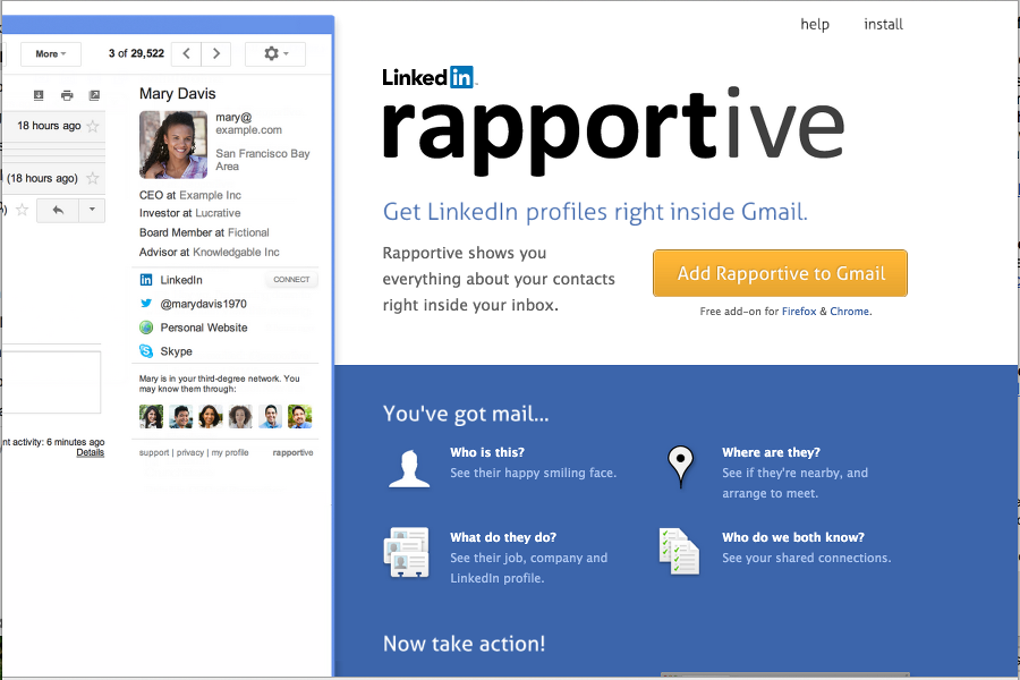
Rapportive is a lightweight browser extension that transforms the way Gmail users interact with their inbox. By surfacing real‑time LinkedIn profiles, company information, and social media activity directly inside the Gmail sidebar, Rapportive helps you identify who you’re emailing without leaving your mailbox. The add‑on works with both Chrome and Firefox, automatically pulling data as soon as you open a conversation.
Whether you’re a sales rep reaching out to a cold lead, a recruiter vetting a candidate, or a freelancer coordinating with multiple clients, Rapportive gives you the context you need to personalize your messages and avoid awkward “who are you?” moments. Because the extension taps into publicly available LinkedIn data, it respects privacy settings and does not store any personal email content on its servers. The result is a secure, free tool that keeps your workflow fast, your outreach smarter, and your networking more informed.
Key Features & Benefits
- LinkedIn Profile Integration: Instantly view a contact’s current LinkedIn headline, photo, and position without opening a new tab.
- Company Details: See the organization’s logo, size, industry, and location to better understand the business context.
- Social Signals: Get a quick snapshot of recent posts, tweets, or other public updates linked to the contact’s profile.
- Real‑Time Updates: The sidebar refreshes automatically whenever a contact updates their LinkedIn information.
- Privacy‑First Design: No email content is stored; only public LinkedIn data is fetched via secure API calls.
- Cross‑Browser Support: Available for both Google Chrome and Mozilla Firefox, with seamless installation from the respective web stores.
- Free Tier: All core functionalities are free, making it an ideal addition for small businesses and individual professionals.
Why Rapportive Improves Your Email Workflow
When you receive an email from an unfamiliar address, the default Gmail experience offers only the sender’s email address and, occasionally, a small avatar. This lack of context can lead to missed opportunities, especially in sales or recruiting where personalization is crucial. Rapportive fills that gap by turning the sidebar into a dynamic “contact card.” You can quickly verify whether the sender’s job title matches the content of the email, spot potential red flags (e.g., a mismatch between claimed position and LinkedIn profile), and tailor your reply with relevant details. This level of insight not only saves time but also builds credibility, as recipients feel you’ve done your homework. Moreover, the visual cue of a profile picture reduces the cognitive load of remembering who each contact is, which is especially helpful when handling dozens of threads daily.
Business Use Cases
Sales teams can use Rapportive to qualify leads on the fly, enriching prospect lists with current titles and company sizes. Recruiters gain instant access to a candidate’s public professional history, making it easier to decide whether to move forward with an interview. Freelancers can confirm a client’s legitimacy before sending invoices, and marketers can align outreach campaigns with up‑to‑date industry trends gleaned from LinkedIn activity. In all cases, the free nature of the tool eliminates the need for costly CRM add‑ons while still delivering essential intelligence.
Installation, Setup & Compatibility
Step‑by‑Step Installation Guide
Getting Rapportive up and running takes less than two minutes. Follow these steps:
- Open the Chrome Web Store or Firefox Add‑ons Marketplace.
- Search for “Rapportive” and click “Add to Chrome” or “Add to Firefox.”
- A confirmation dialog will appear; select “Add Extension.”
- Once installed, you’ll see the Rapportive icon (a blue speech bubble) next to your browser’s address bar.
- Log in to your Gmail account. The first time you open a message, a sidebar will prompt you to sign in with your LinkedIn credentials. This step is required to fetch profile data securely.
- After authentication, the sidebar will appear on the right side of every open email, displaying the contact’s LinkedIn card.
System Requirements & Operating System Support
Rapportive is compatible with the following platforms:
- Google Chrome (version 80 or newer) on Windows 10/11, macOS 10.13+, and Linux distributions.
- Mozilla Firefox (version 75 or newer) on Windows, macOS, and Linux.
- Chrome‑based browsers such as Microsoft Edge and Brave also support the extension, as they share the same extension framework.
The extension does not require any additional software or background services. Because it relies on LinkedIn’s public API, a stable internet connection is essential for real‑time updates. The add‑on is lightweight, typically consuming less than 5 MB of RAM and negligible CPU during idle use.
Troubleshooting Common Issues
If the sidebar does not appear, try the following:
- Refresh the Gmail page after installation.
- Ensure that third‑party cookies are enabled; some browsers block LinkedIn authentication by default.
- Check that you are signed into the same Google account you use for Gmail.
- Verify that your LinkedIn profile is public enough to be accessed; private profiles may return limited data.
For persistent problems, the support page linked within the extension’s options menu provides a step‑by‑step diagnostic checklist and contact information for the development team.
Pros, Cons & Frequently Asked Questions
Pros
- Free and easy to install.
- Provides real‑time LinkedIn data without leaving Gmail.
- Works on both Chrome and Firefox, plus other Chromium browsers.
- Privacy‑first architecture; no email content is stored.
- Improves personalization and credibility in email communication.
Cons
- Relies on LinkedIn public data; limited profiles may show incomplete information.
- Requires a LinkedIn login, which some users may find inconvenient.
- Only displays LinkedIn information – other social platforms are not integrated.
- Occasional latency if LinkedIn API experiences high traffic.
FAQ
Is Rapportive free to use?
Yes, the core features of Rapportive are completely free. You can install the extension and access LinkedIn profile data without any subscription fee.
Which browsers support Rapportive?
Rapportive works on Google Chrome, Mozilla Firefox, Microsoft Edge, and other Chromium‑based browsers. It is available in the respective web stores for each platform.
Do I need a LinkedIn account to use Rapportive?
Yes, a LinkedIn account is required for authentication. The extension uses your LinkedIn login to fetch public profile information securely.
Can I see a contact’s private LinkedIn details?
No. Rapportive only displays information that the contact has made public on their LinkedIn profile. Private or restricted data is never accessed.
Is my email content stored or shared by Rapportive?
No. The extension does not store or transmit any email content. It only requests public LinkedIn data through a secure API call.
Conclusion & Call to Action
Rapportive delivers a simple yet powerful boost to everyday email productivity. By integrating LinkedIn profiles directly into Gmail, it eliminates the need to toggle between tabs, reduces research time, and adds a layer of verification that can prevent miscommunication or fraud. Its free price point, cross‑browser availability, and privacy‑first design make it an attractive addition for anyone who relies on email for business development, recruiting, or client management.
If you’re looking to make every outreach more personalized and informed, downloading Rapportive is a logical first step. Click the install button for Chrome or Firefox, log in with your LinkedIn credentials, and start seeing richer contact information the moment you open an email. Elevate your inbox, build stronger relationships, and stay one step ahead of the competition—download Rapportive today.



.png)



